
Analyze UI screens, extract components, generate JSON configurations, and import directly into your game engine.
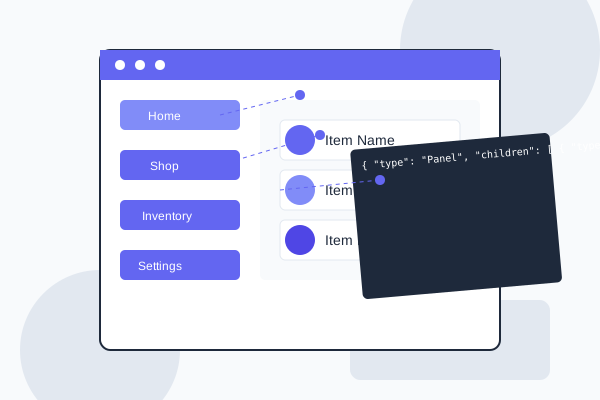
Save hundreds of development hours with our specialized UI analysis tools
Our tool automatically analyzes game UI images generated by Midjourney, Ideogram, or ImageFX, extracts components, and generates ready-to-use configurations.
Upload any game UI screenshot and get detailed component breakdown, style analysis, and layout information.
Convert analyzed screens into structured JSON that can be imported directly into Cocos Creator 3.8 and other game engines.
Browse and filter over 10,000 UI screens by style, type, theme, function, platform, layout, and release year.
Analyze screens from images, videos, URLs, Figma designs, and HTML interfaces with equal precision.
Built-in plugins for Cocos Creator 3.8 and other engines to import UI configurations directly into your projects.
Get suggestions for UI improvements based on genre best practices and player preferences.
Browse our library of analyzed AI-generated game UIs and see how they transform into usable game interfaces
Try our core features directly in your browser
Drag & drop a UI image or click to browse
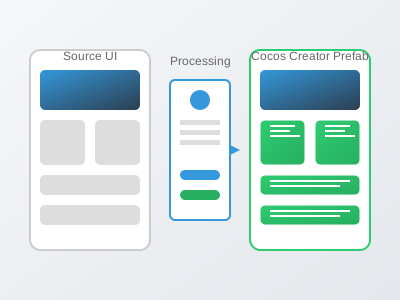
From AI-generated concept to implementation in minutes, not days
Use Midjourney/Ideogram/ImageFX to generate a UI design, or upload an existing design image
Our AI automatically analyzes the image, identifies all UI components, and extracts them
Get structured JSON configuration with all extracted components ready for game engine implementation
Import directly to Cocos Creator 3.8 with our plugin - no manual assembly required
See why developers choose Game UI Importer over other solutions
| Feature | Game UI Importer | Manual UI Development | Generic UI Libraries | UI Importers |
|---|---|---|---|---|
| Game UI Specialization | Excellent | Good | Poor | Average |
| Development Speed | Excellent | Poor | Good | Average |
| Engine Integration | Excellent | Average | Average | Poor |
| Multi-Source Input | Excellent | Average | Poor | Average |
| AI Recommendations | Excellent | Poor | Poor | Poor |
| Customization | Excellent | Excellent | Average | Average |
| Learning Curve | Easy | Difficult | Moderate | Moderate |
We've identified and addressed the biggest pain points in both traditional and AI-assisted game UI implementation
Problem: Manually recreating UI designs in game engines is tedious and can take days or weeks.
Our Solution: Automatic analysis and JSON generation reduces implementation time by up to 94%, turning days of work into minutes.
Problem: Final game UI often doesn't match the original design due to manual implementation errors.
Our Solution: Pixel-perfect analysis ensures the final implementation matches the design exactly as intended.
Problem: Identifying UI components and their properties from flat designs is challenging.
Our Solution: AI-powered component recognition instantly identifies buttons, panels, text fields, and other UI elements with high accuracy.
Problem: Translating designs to different game engine formats requires specialized knowledge.
Our Solution: Built-in plugins for popular engines like Cocos Creator 3.8 allow one-click imports with proper formatting and structure.
Problem: Finding appropriate UI references for specific game types or functions is difficult.
Our Solution: Our categorized library of over 10,000 game UI screens provides instant inspiration and reference for any project.
Problem: Adapting UI from one platform to another requires significant rework.
Our Solution: Automatic detection of platform-specific patterns and intelligent suggestions for cross-platform adaptations.
Problem: Tools like Midjourney, Ideogram, and ImageFX generate complete UI images that still require manual slicing and reassembly in game engines.
Our Solution: Our tool automatically analyzes AI-generated images, extracts components, and creates ready-to-use assets and configurations.
Problem: ChatGPT and similar tools can generate HTML prototypes, but sprites need to be manually created, styles are inconsistent, and they can't be directly used in Unity or Cocos Creator.
Our Solution: Our Cocos Creator plugin enables direct import of analyzed UI with all components, maintaining consistent style without manual assembly.
Join thousands of satisfied developers who have streamlined their UI workflow
"Game UI Importer saved our team weeks of work. We imported our UI designs directly into Cocos Creator and had working menus in hours instead of days. The JSON generation is flawless."

"As a solo developer, UI implementation was always my bottleneck. With Game UI Importer, I can focus on gameplay and let the tool handle all the UI heavy lifting. It's been a game-changer for my workflow."

"The component recognition is incredibly accurate. It identified all UI elements from our Figma designs and generated perfect JSON that we could import directly. No more manual recreation!"

We prioritize security, reliability, and transparency in everything we do

Your data is protected under strict European privacy standards with end-to-end encryption and secure processing

All communications are encrypted with 256-bit TLS/SSL security to keep your designs and assets protected

Our REST APIs follow OpenAPI standards with comprehensive documentation, rate limiting and OAuth 2.0 security
Connect with other game developers and get support
Join discussions, share your projects, and learn from other developers using Game UI Importer.
Visit ForumContribute to our open-source components and access community-created templates.
View RepositoryFree tutorials, webinars and courses on game UI design and implementation.
Start LearningGet help from our team of game UI specialists with 24/7 priority support.
Contact SupportWe believe in being completely transparent about our service
See how game developers are succeeding with our tools

"Our team of 5 developers was spending weeks implementing UI designs into our Cocos Creator game. With Game UI Importer, we now process the same volume of screens in days instead of weeks. The accuracy of component detection and automatic hierarchy generation has transformed our workflow."

Flexible options for every team size and project
Get started with basic features
Perfect for individual developers
Scale with your entire team
Find answers to common questions about Game UI Importer
Game UI Importer is an AI-powered tool that analyzes UI designs from various sources and converts them into ready-to-use prefabs for game engines. It automatically detects components, extracts assets, and generates the necessary code structure, saving developers significant implementation time.
Our AI consistently achieves 94% accuracy in detecting and categorizing UI components across various design styles. For complex or custom components, our Visual Validation & Correction tool allows you to make adjustments before final export.
We currently support Cocos Creator with full integration, Unity with comprehensive prefab generation, and experimental support for Unreal Engine. Our roadmap includes expanding support for additional engines and frameworks based on community demand.
Yes, our specialized Midjourney to Cocos prefab converter is designed specifically for this purpose. It includes optimizations for Midjourney's unique art style and can accurately detect UI components from Midjourney-generated images. The tool maintains visual fidelity while creating functional prefabs.
Our Ideogram converter analyzes the design patterns specific to Ideogram-generated UI images and translates them into Cocos Creator prefabs. It includes specialized style analysis algorithms, automatic asset extraction, and component relationship detection optimized for Ideogram's output characteristics.
Absolutely! Our ChatGPT to Cocos Prefab converter supports both images from ChatGPT's DALL-E integration and code snippets (HTML/CSS/SVG) generated by ChatGPT. You can upload images directly or paste code, and our system will automatically process and convert them to functional game UI components.
We support a wide range of input formats including PNG, JPG, WebP, SVG, PSD (Photoshop), Figma designs (via API), HTML/CSS, and direct integration with AI generation platforms like Midjourney, Ideogram, and ChatGPT.
Yes, we provide a comprehensive REST API that allows you to integrate Game UI Importer directly into your workflow. The API includes endpoints for uploading designs, processing UI, managing projects, and exporting to different game engines. We also offer SDKs for popular programming languages.
Yes, we offer a free tier that allows you to process up to 5 screens per month with full functionality. This gives you the opportunity to test the tool with your specific designs and workflow before committing to a paid plan. No credit card is required to start with the free tier.
Join thousands of game developers who have accelerated their UI development process
No credit card required. Start with our free plan today.